Under the Hood of Redux: Create a Lightweight State Manager
Have you ever thought of how the popular state management library works under the hood? If not, pause for a while and think... I'll come back to it later.
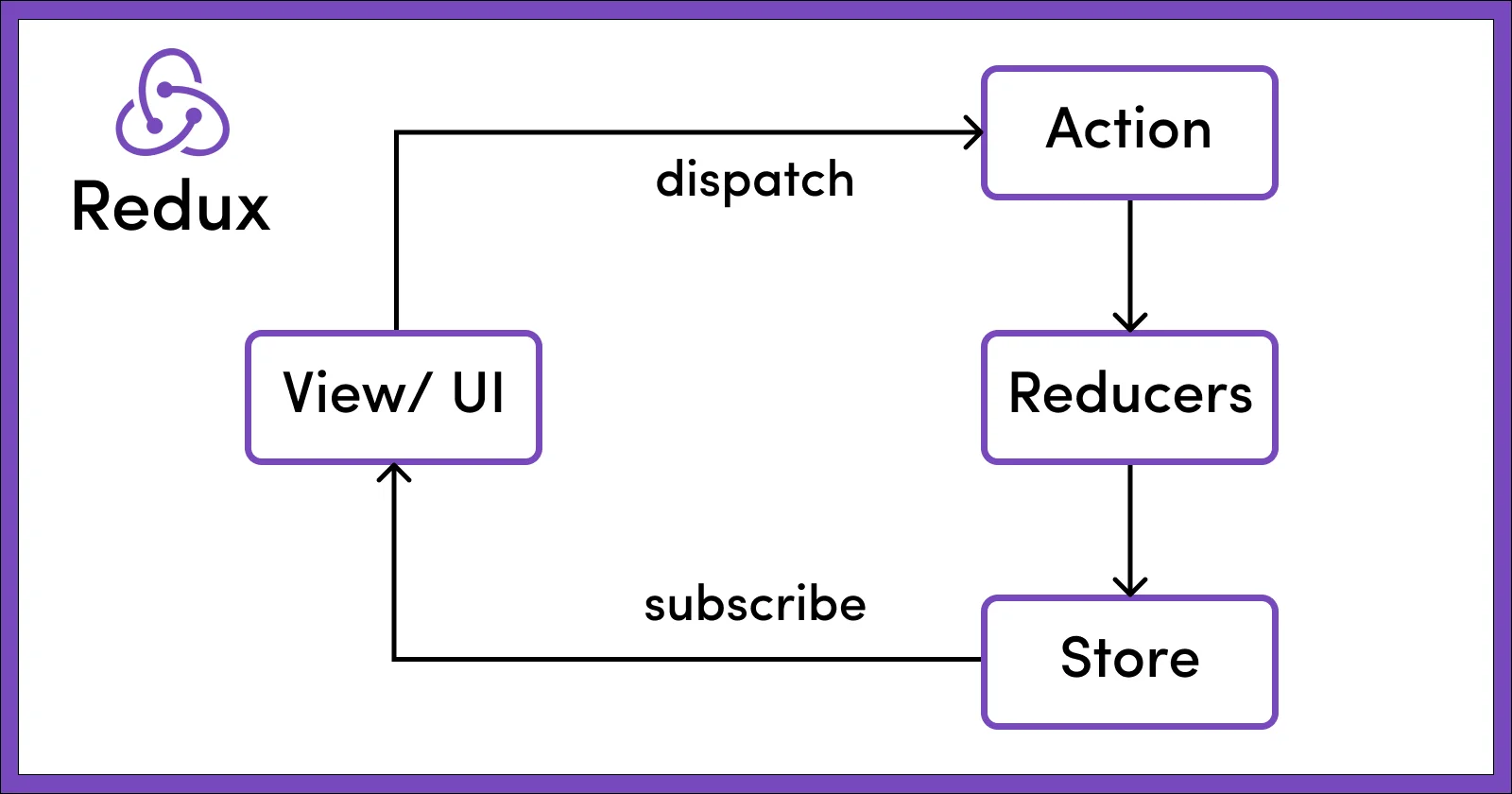
Before we write our own state management util, you might be thinking why not Context API instead of these state management libraries. Well, that's a very fair ask.
Here's my short answer to it.
Context API vs State management library
Context API
- Ideal for avoiding prop drilling, not for state management.
- When the value in a
Context.Providerchanges, every component that consumes that context (viauseContext) will re-render, regardless of whether they use the specific part of the state that changed.
State management library
- Meant for managing state centrally and predictably in an App.
- Optimised for performance, only re-renders based on state
selectorused for consuming the state — i.e. It only re-renders when the specific state returned by theselectorhas been changed. You might already know what aselectoris, if not you'll know by the end of this article. - Libraries like Redux provide additional tooling like time travel debugging.
DIY central state management
When I thought of how state management libraries work under the hood, a question came to my mind:
How would a component know when it has to re-render?
Well, the answer is simple when you realise it.
- We'll create a central
store. - Wherever we use the
store, we'llsubscribe(a callback to be called when state update occurs) to thelistenersmaintained in ourstore. We'llunsubscribeit when component is unmounted. What happens in a callback when we subscribe will be clear in upcoming sections. - Any state update will happen only via an action called
dispatch. - When
dispatchis called, we will call all the subscription callbacks inlisteners.
Reducer
Similar to Redux, to make predictable state updates we'll define a reducer function which takes the current state and the action, it'll return the updated state based on action taken.
I'll be taking example of states for simple message and counter components:
// initial state
const INITIAL_STATE = {
  message: "",
  counter: 0,
};

function reducer(state, action) {
  switch (action.type) {
    case "INCREMENT_COUNTER":
      // Notice how we are returning new object, instead of modifying it directly
      // state updates should always be immutable
      return { ...state, counter: state.counter + 1 };
    case "DECREMENT_COUNTER":
      return { ...state, counter: state.counter - 1 };
    case "UPDATE_MESSAGE":
      return { ...state, message: action.payload };
    default:
      return state;
  }
}
createStore
Let's write our createStore function which will return subscribe, getState and dispatch methods.
function createStore(initialState, reducer) {
  let state = initialState;
  let listeners = [];

  // subscribe to the listener
  function subscribe(listener) {
    listeners.push(listener);

    function unsubscribe() {
      listeners = listeners.filter((_listener) => _listener !== listener);
    }

    // return to unsubscribe the current listener
    return unsubscribe;
  }

  // get state
  function getState() {
    return state;
  }

  // dispatch function
  function dispatch(action) {
    // get latest state
    state = reducer(state, action);
    // call all the subscribed listeners
    listeners.forEach((listener) => listener());
  }

  return {
    getState,
    subscribe,
    dispatch,
  };
}
useSelector
Now comes the important logic where the magic (optimisation) happens. Whenever we need to use any state, we'll do it using useSelector by providing it a selector callback (which basically accepts the full state and returns the required state to use).
// selecting state based on given selector
export function useSelector(selector) {
  const [, forceRender] = useReducer((x) => !x, true);
  const value = useRef(selector(store.getState()));

  useEffect(() => {
    // to be subscribed and will be called whenever any dispatch occurs
    const onDispatch = () => {
      const latestValue = selector(store.getState());

      // forceRender if the latestValue is not same as previous value
      if (latestValue !== value.current) {
        value.current = latestValue;
        forceRender();
      }
    };

    const unsubscribe = store.subscribe(onDispatch);

    // unsubscribe on cleanup
    return unsubscribe;
  }, [selector]);

  return value.current;
}
There is a hook useSyncExternalStore already present in React versions 18 and above, which simplifies the above logic, you may simply do it like below:
import { useSyncExternalStore } from 'react'

export function useSelector(selector) {
  return useSyncExternalStore(store.subscribe, () =>
    selector(store.getState())
  );
}
Complete util
Here's all the code in one place:
import { useReducer, useRef, useEffect, useSyncExternalStore } from "react";

function createStore(initialState, reducer) {
  let state = initialState;
  let listeners = [];

  // subscribe to the listener
  function subscribe(listener) {
    listeners.push(listener);

    function unsubscribe() {
      listeners = listeners.filter((_listener) => _listener !== listener);
    }

    // return to unsubscribe the current listener
    return unsubscribe;
  }

  // get state
  function getState() {
    return state;
  }

  // dispatch function
  function dispatch(action) {
    // get latest state
    state = reducer(state, action);
    // call all the subscribed listeners
    listeners.forEach((listener) => listener());
  }

  return {
    getState,
    subscribe,
    dispatch,
  };
}

// initial state
const INITIAL_STATE = {
  message: "",
  counter: 0,
};

// reducer function
function reducer(state, action) {
  switch (action.type) {
    case "INCREMENT_COUNTER":
      // Notice how we are returning new object, instead of modifying it directly
      // state updates should always be immutable
      return { ...state, counter: state.counter + 1 };
    case "DECREMENT_COUNTER":
      return { ...state, counter: state.counter - 1 };
    case "UPDATE_MESSAGE":
      return { ...state, message: action.payload };
    default:
      return state;
  }
}

// selecting state based on given selector
export function useSelector(selector) {
  const [, forceRender] = useReducer((x) => !x, true);
  const value = useRef(selector(store.getState()));

  useEffect(() => {
    // to be subscribed and will be called whenever any dispatch occurs
    const onDispatch = () => {
      const latestValue = selector(store.getState());

      // forceRender if the latestValue is not same as previous value
      if (latestValue !== value.current) {
        value.current = latestValue;
        forceRender();
      }
    };

    const unsubscribe = store.subscribe(onDispatch);

    // unsubscribe on cleanup
    return unsubscribe;
  }, [selector]);

  return value.current;
}

// Alternate, if using React 18 and above
// export function useSelector(selector) {
//   return useSyncExternalStore(store.subscribe, () =>
//     selector(store.getState())
//   );
// }

export const store = createStore(INITIAL_STATE, reducer);
Usage
Message Component
import { store, useSelector } from "../store";

export const Message = () => {
  const value = useSelector((state) => state.message);
  console.log("Message rendered");
  return (
    <div>
      <input
        value={value}
        onChange={(event) =>
          store.dispatch({
            type: "UPDATE_MESSAGE",
            payload: event.target.value,
          })
        }
      />
      <div>{value}</div>
    </div>
  );
};
Counter Component
import { store, useSelector } from "../store";

export const Counter = () => {
  const count = useSelector((state) => state.counter);

  console.log("Counter rendered");

  return (
    <div>
      <div style={{ display: "flex", gap: 12 }}>
        <button
          onClick={() => {
            store.dispatch({ type: "INCREMENT_COUNTER" });
          }}
        >
          +
        </button>
        <button
          onClick={() => {
            store.dispatch({ type: "DECREMENT_COUNTER" });
          }}
        >
          -
        </button>
      </div>
      <div>Count: {count}</div>
    </div>
  );
};
App Component
import { Counter } from "./components/Counter";
import { Message } from "./components/Message";
import "./styles.css";

export default function App() {
  return (
    <div className="App" style={{ display: "flex", gap: 40 }}>
      <Message />
      <Counter />
    </div>
  );
}
Here's the sandbox of the implementation:
And with that we've a basic working state management util ready. You'll notice that updating state of one component doesn't re-render the other component.
Also, I've skipped the context provider, middleware and many other parts of Redux which they use, since my aim was to demonstrate the working of basic central state management in our app.
Disclaimer
The above code is just for demonstration purpose and not intended for as-is production usage. It's not fully optimised for all the edge cases.